
Squarespace emails you every time someone fills in your form. The person who filled it in gets nothing: no confirmation, no copy of what they sent. For an RSVP, a booking request or an order form, that copy is exactly what they want.
There's no setting for it, and the usual fix, Zapier, needs the Core plan and a paid account. Here's a free way that works on every plan, Basic included. Squarespace saves each submission to a Google Sheet, and a small script in that sheet emails each person a copy of their answers. We tested it on a live site, and it takes about ten minutes to set up.
What your guests get
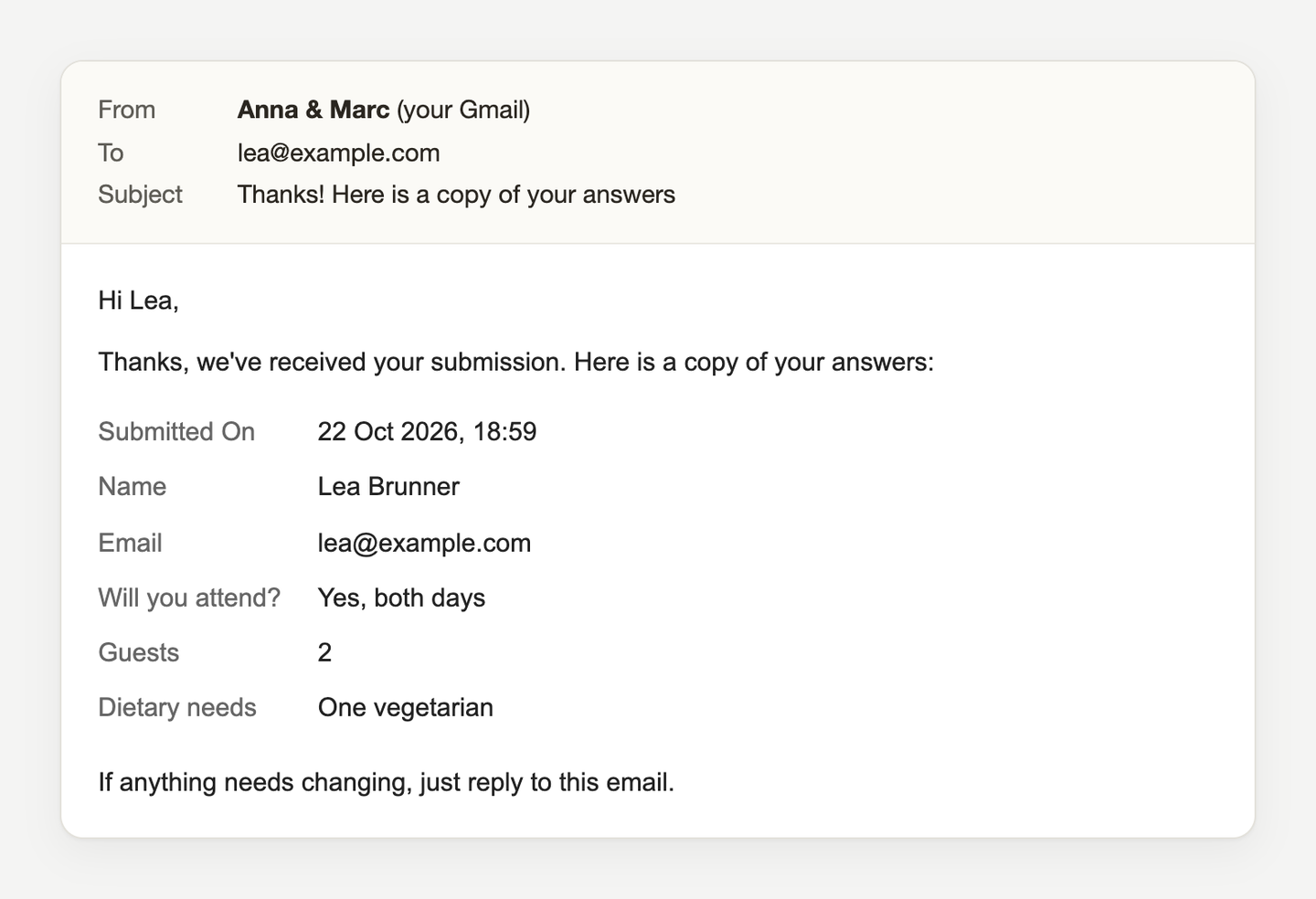
The copy arrives within about five minutes, from your Gmail, with your business name as the sender. Squarespace's own notification to you keeps working as before.
What you need
- A Squarespace site, on any plan.
- A Google account. A free Gmail is fine, and the copies are sent from it.
- About ten minutes, ideally on a computer.
Step 1: Save your form to a Google Sheet
In Squarespace, edit the page with your form and open the form block's settings. Under Storage, click Connect next to Google Drive, sign in with Google and click Allow. Then type a Spreadsheet name, for example "RSVP answers", and connect. Squarespace creates that spreadsheet in your Google Drive.
Keep your email storage connected too, so you still get notified. And don't rename the spreadsheet later: Squarespace disconnects a renamed sheet.
Step 2: Send yourself a test submission
Fill in your live form once. Within a minute or two a row appears in the spreadsheet, under a header row with one column per question. The script needs those headers.
Step 3: Open Apps Script
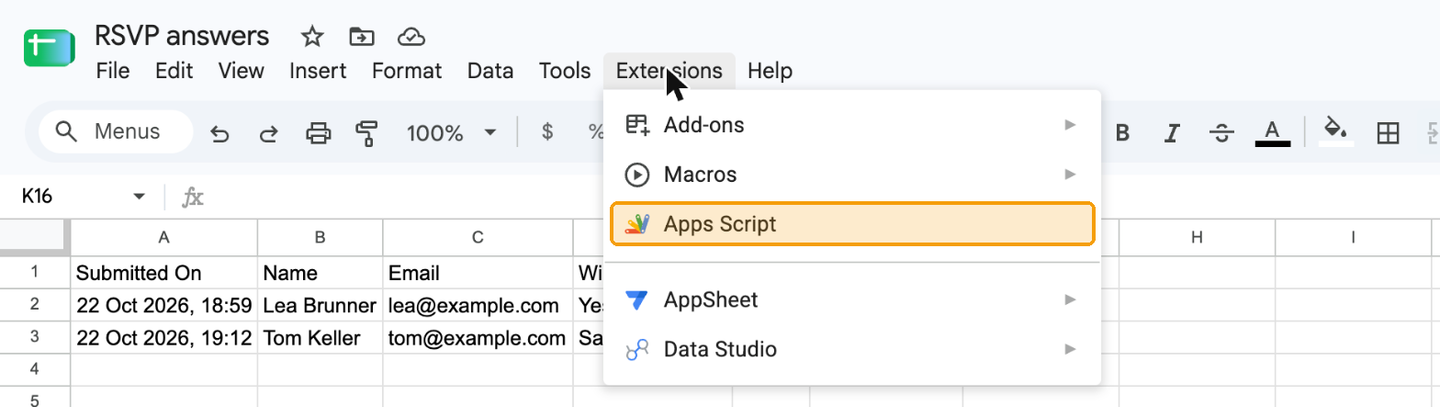
Open the spreadsheet in Google Drive and click Extensions, then Apps Script. A new tab opens.
Step 4: Paste the script
You'll see a few lines of sample text. Click into them, select everything (Cmd+A on a Mac, Ctrl+A on Windows) and delete it.
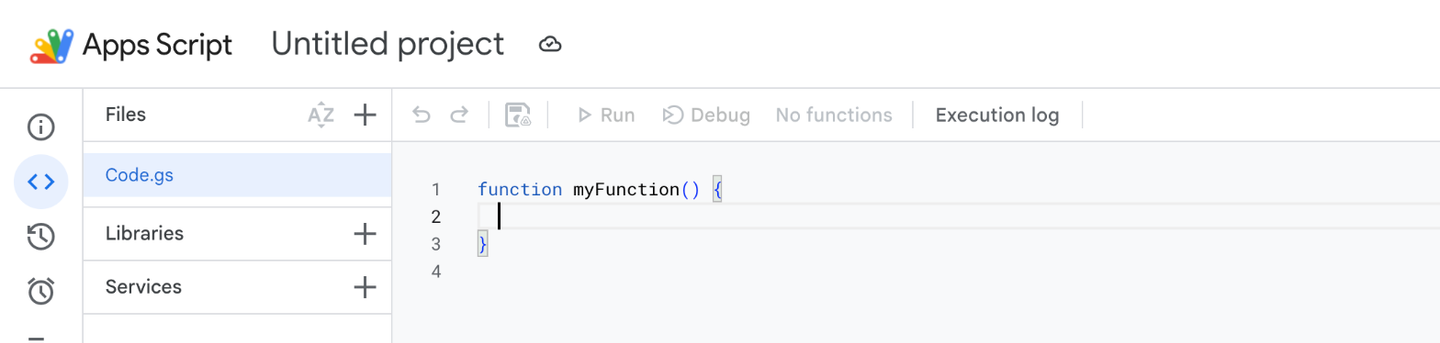
Now press the green Copy the script button below. Click into the empty editor and paste (Cmd+V on a Mac, Ctrl+V on Windows). If the button doesn't work, open the script as plain text and copy it from there.
/** @OnlyCurrentDoc */
/**
* Guest confirmations: emails everyone who fills in your Squarespace
* form a copy of their answers. Setup guide:
* https://pengon.dev/blog/squarespace-form-confirmation-email/
* Change SENDER_NAME and REPLY_TO below and save. Then reload the
* sheet and click Guest confirmations > Turn on.
*/
var CONFIG = {
// Shown as the sender's name. The email itself comes from the Gmail
// account that turns this on.
SENDER_NAME: 'Your business name',
// Where guests' replies go: usually your own address.
REPLY_TO: 'you@example.com',
SUBJECT: 'Thanks! Here is a copy of your answers',
INTRO: "Thanks, we've received your submission. Here is a copy of your answers:",
OUTRO: 'If anything needs changing, just reply to this email.',
// How often to look for new submissions: 1, 5, 10, 15 or 30 minutes.
CHECK_EVERY_MINUTES: 5,
DAILY_LIMIT: 50,
ONE_PER_EMAIL_HOURS: 24,
SKIP_IF_LINKS: true,
// Column headers to leave out of the email, e.g. ['Submitted On'].
HIDE_COLUMNS: [],
};
var LOG_SHEET_NAME = 'Confirmations sent';
var LOG_HEADERS = ['Logged at', 'Row key', 'Guest email', 'Status'];
// A burst of "new" rows (a pasted import, say) is handled a few at a time.
var MAX_PER_RUN = 20;
var EMAIL_RE = /^[^\s@<>()",;]+@[^\s@<>()",;]+\.[a-z]{2,}$/i;
var LINK_RE = /https?:\/\/|www\.|\b(?:bit\.ly|t\.me|tinyurl\.com|goo\.gl)\//i;
var HOUR_MS = 60 * 60 * 1000;
// -- Menu actions ------------------------------------------------------
function onOpen() {
SpreadsheetApp.getUi()
.createMenu('Guest confirmations')
.addItem('Turn on', 'turnOn')
.addItem('Send me a test email', 'sendTestEmail')
.addItem('Turn off', 'turnOff')
.addToUi();
}
function turnOn() {
checkConfig_();
var ss = SpreadsheetApp.getActiveSpreadsheet();
var log = logSheet_(ss);
var data = readSubmissions_(ss);
var known = readLog_(log).keys;
var now = new Date();
// Everything already in the sheet predates this switch: mark it done.
var entries = [];
data.rows.forEach(function (row) {
var key = rowKey_(row);
if (!key || known[key]) return;
known[key] = true;
entries.push([now, key, findEmail_(data.headers, row), 'existing before turn-on, not emailed']);
});
appendLogRows_(log, entries);
removeTriggers_();
ScriptApp.newTrigger('processNewSubmissions')
.timeBased()
.everyMinutes(CONFIG.CHECK_EVERY_MINUTES)
.create();
notify_(
'Guest confirmations are on',
'New submissions get a copy within ' + CONFIG.CHECK_EVERY_MINUTES + ' minutes. ' +
entries.length + ' earlier submission(s) were marked as done and will not be emailed.'
);
}
function turnOff() {
removeTriggers_();
notify_('Guest confirmations are off', 'No more copies will be sent until you turn it on again.');
}
/** Emails YOU (REPLY_TO) what the latest guest would get, so you can check the wording. */
function sendTestEmail() {
checkConfig_();
var ss = SpreadsheetApp.getActiveSpreadsheet();
var data = readSubmissions_(ss);
if (!data.rows.length) {
notify_('Nothing to preview yet', 'Submit your form once, then try again.');
return;
}
var latest = data.rows[data.rows.length - 1];
sendCopy_(CONFIG.REPLY_TO, data.headers, latest, ss.getSpreadsheetTimeZone(), '[Test] ');
notify_('Test email sent', 'Check ' + CONFIG.REPLY_TO + '. It shows the latest submission.');
}
// -- The trigger -------------------------------------------------------
/** Runs every CHECK_EVERY_MINUTES: emails guests whose rows are new. */
function processNewSubmissions() {
var lock = LockService.getScriptLock();
if (!lock.tryLock(10000)) return; // a previous run is still going
try {
var ss = SpreadsheetApp.getActiveSpreadsheet();
var log = logSheet_(ss);
var data = readSubmissions_(ss);
var history = readLog_(log);
var tz = ss.getSpreadsheetTimeZone();
var now = new Date();
var sentToday = history.sentTimes.filter(function (t) {
return t > now.getTime() - 24 * HOUR_MS;
}).length;
var entries = [];
for (var i = 0; i < data.rows.length && entries.length < MAX_PER_RUN; i++) {
var row = data.rows[i];
var key = rowKey_(row);
if (!key || history.keys[key]) continue;
history.keys[key] = true;
var email = findEmail_(data.headers, row);
var status = skipReason_(data.headers, row, email, history, sentToday, now);
if (!status) {
try {
sendCopy_(email, data.headers, row, tz, '');
status = 'sent';
sentToday++;
history.lastSent[email.toLowerCase()] = now.getTime();
} catch (err) {
// Usually Gmail's daily quota. Log it and stop; later rows are
// left for the next run rather than all failing the same way.
entries.push([now, key, email, 'error: ' + String((err && err.message) || err).slice(0, 200)]);
break;
}
}
entries.push([now, key, email, status]);
}
appendLogRows_(log, entries);
} finally {
lock.releaseLock();
}
}
/**
* Why this row must not be emailed, or '' if it may be. A form that
* emails whatever address is typed into it can be abused to send mail
* to strangers in your name, so: one copy per address per
* ONE_PER_EMAIL_HOURS, at most DAILY_LIMIT a day (Gmail's own cap is
* about 100), and nothing for submissions with links (spam nearly always
* has one). Rows already in the sheet at Turn on are never emailed.
*/
function skipReason_(headers, row, email, history, sentToday, now) {
if (!email) return 'skipped: no valid email address';
if (CONFIG.SKIP_IF_LINKS && hasLink_(row)) return 'skipped: contains a link';
var last = history.lastSent[email.toLowerCase()];
if (last && now.getTime() - last < CONFIG.ONE_PER_EMAIL_HOURS * HOUR_MS) {
return 'skipped: already sent to this address recently';
}
if (sentToday >= CONFIG.DAILY_LIMIT) return 'skipped: daily limit reached';
return '';
}
// -- The email ---------------------------------------------------------
function sendCopy_(to, headers, row, tz, subjectPrefix) {
var msg = buildMessage_(headers, row, tz);
MailApp.sendEmail({
to: to,
subject: subjectPrefix + CONFIG.SUBJECT,
body: msg.text,
htmlBody: msg.html,
name: CONFIG.SENDER_NAME,
replyTo: CONFIG.REPLY_TO,
});
}
/** Every answered question, in the form's order, as plain text and HTML. */
function buildMessage_(headers, row, tz) {
var hidden = CONFIG.HIDE_COLUMNS.map(function (h) {
return String(h).trim().toLowerCase();
});
var answers = [];
headers.forEach(function (header, i) {
var label = String(header).trim() || 'Answer';
var value = displayValue_(row[i], tz);
if (value === '' || hidden.indexOf(label.toLowerCase()) !== -1) return;
answers.push({ label: label, value: value });
});
var name = findFirstName_(headers, row);
var greeting = name ? 'Hi ' + name + ',' : 'Hello,';
var text = [greeting, '', CONFIG.INTRO, '']
.concat(answers.map(function (a) { return a.label + ': ' + a.value; }))
.concat(['', CONFIG.OUTRO])
.join('\n');
var cell = 'padding:6px 0;vertical-align:top;';
var html =
'<div style="font-family:Arial,Helvetica,sans-serif;font-size:15px;line-height:1.5;color:#222">' +
'<p>' + escapeHtml_(greeting) + '</p>' +
'<p>' + escapeHtml_(CONFIG.INTRO) + '</p>' +
'<table cellpadding="0" cellspacing="0" style="border-collapse:collapse;margin:8px 0 16px">' +
answers.map(function (a) {
return '<tr><td style="' + cell + 'padding-right:16px;color:#666">' + escapeHtml_(a.label) +
'</td><td style="' + cell + '">' + escapeHtml_(a.value).replace(/\n/g, '<br>') + '</td></tr>';
}).join('') +
'</table>' +
'<p>' + escapeHtml_(CONFIG.OUTRO) + '</p>' +
'</div>';
return { text: text, html: html };
}
function displayValue_(value, tz) {
if (isDate_(value)) return Utilities.formatDate(value, tz, 'd MMM yyyy, HH:mm');
if (value === true) return 'Yes';
if (value === false) return 'No';
return value === null || value === undefined ? '' : String(value).trim();
}
// -- Reading the sheet -------------------------------------------------
/** The tab Squarespace writes to: the first one that isn't our log. */
function readSubmissions_(ss) {
var sheet = ss.getSheets().filter(function (s) {
return s.getName() !== LOG_SHEET_NAME;
})[0];
if (!sheet) throw new Error('No submissions tab found in this spreadsheet.');
var values = sheet.getDataRange().getValues();
return { headers: values[0] || [], rows: values.slice(1) };
}
/** Prefers a column whose header says email; falls back to any cell that is one. */
function findEmail_(headers, row) {
var byHeader = [];
var rest = [];
headers.forEach(function (h, i) {
(/e-?mail/i.test(String(h)) ? byHeader : rest).push(i);
});
var order = byHeader.concat(rest);
for (var k = 0; k < order.length; k++) {
var value = String(row[order[k]] === undefined ? '' : row[order[k]]).trim();
if (EMAIL_RE.test(value)) return value;
}
return '';
}
function findFirstName_(headers, row) {
for (var i = 0; i < headers.length; i++) {
var h = String(headers[i]).trim();
if (/first\s*name/i.test(h) || /^(full\s*)?name$/i.test(h)) {
var first = String(row[i] || '').trim().split(/\s+/)[0];
if (first) return first;
}
}
return '';
}
function hasLink_(row) {
return row.some(function (cell) {
var text = String(cell === undefined || cell === null ? '' : cell);
return !EMAIL_RE.test(text.trim()) && LINK_RE.test(text);
});
}
/**
* Identifies a submission across runs. Built from the row's non-empty
* values, sorted, so adding a field to the form later (a new, empty
* column on old rows) doesn't make every old row look new.
*/
function rowKey_(row) {
var parts = row
.map(function (v) {
return isDate_(v) ? v.toISOString() : String(v === null || v === undefined ? '' : v).trim();
})
.filter(function (s) { return s !== ''; })
.sort();
if (!parts.length) return '';
var bytes = Utilities.computeDigest(
Utilities.DigestAlgorithm.SHA_256,
JSON.stringify(parts),
Utilities.Charset.UTF_8
);
return bytes
.map(function (b) { return ('0' + (b & 0xff).toString(16)).slice(-2); })
.join('')
.slice(0, 32);
}
// -- The log tab -------------------------------------------------------
function logSheet_(ss) {
var log = ss.getSheetByName(LOG_SHEET_NAME);
if (log) return log;
log = ss.insertSheet(LOG_SHEET_NAME, ss.getSheets().length);
log.appendRow(LOG_HEADERS);
log.setFrozenRows(1);
return log;
}
function readLog_(log) {
var history = { keys: {}, sentTimes: [], lastSent: {} };
log.getDataRange().getValues().slice(1).forEach(function (r) {
var key = String(r[1] || '');
if (key) history.keys[key] = true;
if (r[3] !== 'sent' || !isDate_(r[0])) return;
var t = r[0].getTime();
var email = String(r[2] || '').toLowerCase();
history.sentTimes.push(t);
if (!history.lastSent[email] || history.lastSent[email] < t) history.lastSent[email] = t;
});
return history;
}
function appendLogRows_(log, entries) {
if (!entries.length) return;
log.getRange(log.getLastRow() + 1, 1, entries.length, LOG_HEADERS.length).setValues(entries);
}
// -- Helpers -----------------------------------------------------------
function checkConfig_() {
var problems = [];
if (!CONFIG.SENDER_NAME || CONFIG.SENDER_NAME === 'Your business name') {
problems.push('SENDER_NAME: put your business name');
}
if (!EMAIL_RE.test(String(CONFIG.REPLY_TO)) || CONFIG.REPLY_TO === 'you@example.com') {
problems.push('REPLY_TO: put the address guests should reply to');
}
if ([1, 5, 10, 15, 30].indexOf(CONFIG.CHECK_EVERY_MINUTES) === -1) {
problems.push('CHECK_EVERY_MINUTES: must be 1, 5, 10, 15 or 30');
}
if (problems.length) {
throw new Error('Fill in CONFIG at the top of the script first. ' + problems.join('; '));
}
}
function removeTriggers_() {
ScriptApp.getProjectTriggers().forEach(function (t) {
if (t.getHandlerFunction() === 'processNewSubmissions') ScriptApp.deleteTrigger(t);
});
}
/** A pop-up when run from the sheet's menu; a log line when run from the editor. */
function notify_(title, message) {
try {
var ui = SpreadsheetApp.getUi();
ui.alert(title, message, ui.ButtonSet.OK);
} catch (e) {
console.log(title + ': ' + message);
}
}
function isDate_(value) {
return Object.prototype.toString.call(value) === '[object Date]' && !isNaN(value.getTime());
}
function escapeHtml_(s) {
return String(s)
.replace(/&/g, '&')
.replace(/</g, '<')
.replace(/>/g, '>')
.replace(/"/g, '"');
}
Then change two things near the top. Replace only the words between the quote marks:
- Your business name (line 14): the name your guests know you by, for example Anna & Marc.
- [email protected] (line 16): the email address where guests' replies should go, for example [email protected].
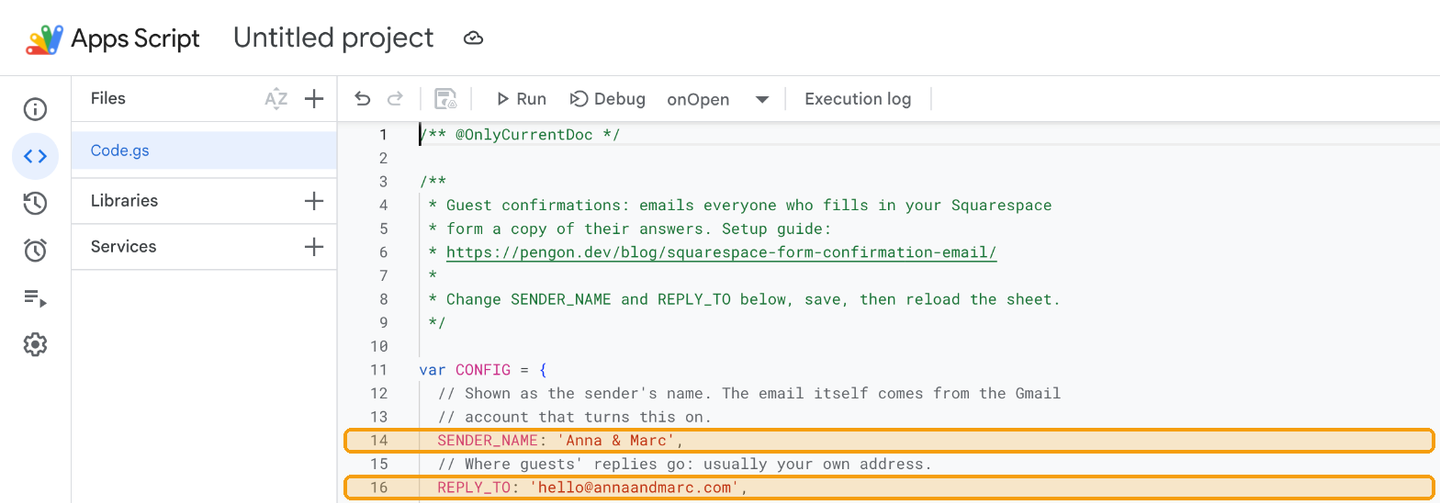
If you like, click Untitled project at the top and rename it "Guest confirmations". That's the name Google shows in the next step.
Step 5: Turn it on
Go back to the spreadsheet and reload the page. After a few seconds a new menu appears, Guest confirmations. Click Guest confirmations → Turn on.
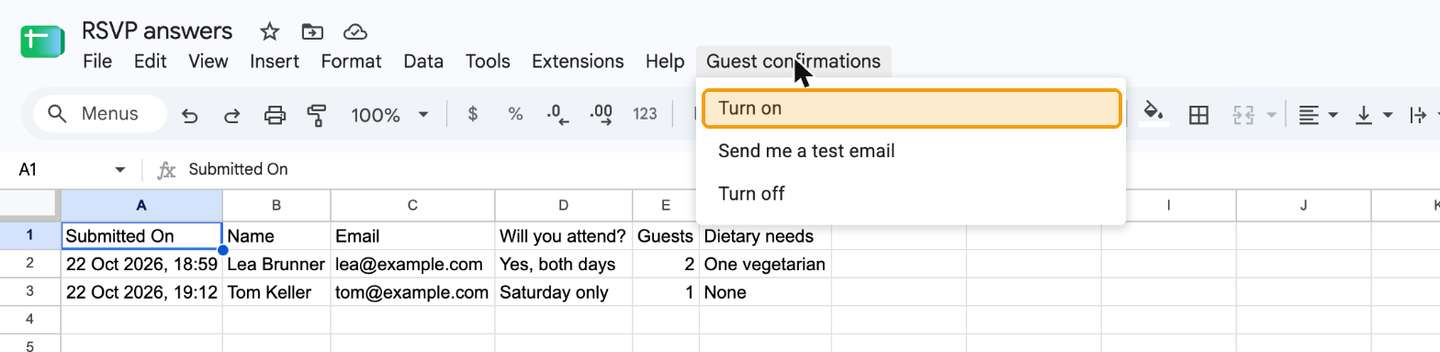
Google then asks for your permission, just this once:
- Continue, and choose your Google account.
- If Google says it hasn't verified this app, click Advanced, then Go to Guest confirmations (unsafe). You see this for any script you add to your own sheet. It only means Google hasn't reviewed it.
- Tick Select all and click Continue. The script asks to manage this spreadsheet, send email as you, and run when you're not there, which is its check every five minutes.
A message confirms that guest confirmations are on. If it doesn't appear, click Turn on once more. Everything already in the sheet is marked as done, so nobody who submitted before gets an email.
Step 6: Test it
Guest confirmations → Send me a test email shows you the email your latest guest would get. Then fill in your form using a second email address you can check. Within about five minutes that address gets its copy, and a new tab in the spreadsheet, Confirmations sent, logs it:
| Status | Guest email |
|---|---|
| existing before turn-on, not emailed | [email protected] |
| sent | [email protected] |
| skipped: contains a link | [email protected] |
Why the script has safeguards
A form that emails whatever address is typed into it can be abused: a bot types a stranger's address, puts spam in the message, and your Gmail delivers it in your name. So the script:
- never emails anyone who submitted before you turned it on,
- skips submissions that contain a link, as spam nearly always does,
- sends one copy per address per day,
- stops at 50 copies a day (a free Gmail account can send about 100),
- logs every decision in the Confirmations sent tab.
Optional: fine-tune it
You don't need to change anything else. If you want to, these lines near the top of the script control the details. After a change, save, then click Guest confirmations → Turn on again.
- The email's wording: the
SUBJECT,INTROandOUTROlines. - How often it checks:
CHECK_EVERY_MINUTES, every 5 minutes unless you change it (1, 5, 10, 15 or 30). - The most copies a day:
DAILY_LIMIT, 50 to start with. - One copy per person:
ONE_PER_EMAIL_HOURS, one copy per email address every 24 hours. - Skip messages with links:
SKIP_IF_LINKS, on unless you changetruetofalse. - Leave a question out of the email: add its column name to
HIDE_COLUMNS, for example['Submitted On'].
Frequently asked questions
Why up to five minutes, and not instantly?
Google runs the script on a schedule, not at the moment someone submits. It can check every minute instead (the CHECK_EVERY_MINUTES line), but on a free Google account that uses up a big part of the script time Google allows each day. Every five minutes is the safe choice.
Which address does the copy come from?
From the Google account you used to turn it on, with your business name as the sender. Replies go to the email address you typed in. To send from your business address instead, turn it on while signed in to a Google Workspace account on that address.
I have more than one form. Does it work for all of them?
Yes. Each form gets its own spreadsheet, so add the script to each spreadsheet the same way.
What happens if I add a question to my form later?
It's included automatically, because the script reads the columns every time. Guests who already got a copy don't get a second one.
Nothing arrived. What do I check?
Open the Confirmations sent tab. No new row means the script hasn't seen the submission yet, as Squarespace can take a minute or two to write to the sheet. A row starting with "skipped" or "error" says why. Also check the guest's spam folder.
Every submission says "contains a link". Why?
One of your questions collects links, a website field for example. Near the top of the script, change SKIP_IF_LINKS: true to SKIP_IF_LINKS: false, save, and click Turn on again.
How do I turn it off?
In the spreadsheet, click Guest confirmations → Turn off.
Does Pengon see my form submissions?
No. The script runs in your Google account and only talks to Google. We never see your spreadsheet or your guests.
On Squarespace Core or higher? Pengon sends the copy the moment someone submits, and only to real people: it filters out the spam first, and spam never gets a copy. We're in our founding-member window: $149 USD once, lifetime, first 20 seats (then $299), or $5.99 a month, with a 21 day free trial, no credit card. Built in Zürich by Quad Studio.